 Random BibleFree app for iPhone, Android and computers
A free daily Bible verse app for your home screen
Random Bible is a free web app that puts today’s Bible verse on your home screen. Draw another, keep the ones that speak to you, and read them with no signal. It installs from your browser, with no app store and no account.


- No app storeInstalls from Safari, Chrome or Edge
- No accountNothing to sign up for
- Works offlineThe verses live on your device
- FreeNothing to pay for
The app and the website
The website
Draw a verse, read a chapter, browse topics and wallpapers. Open random-bible.com in any browser when you think of it.
The app
An icon on your home screen that opens straight to today’s verse, with your saved list, the Memorize exercise and offline reading.
Today
A verse of the day, every morning
The verse of the day is on screen the moment you open the app. It is the same verse for everyone that day, and it changes at your local midnight.


Another verse
A random verse on demand, from the whole Bible or just the Psalms
Each tap draws from verses hand-picked for peace, hope, strength and comfort. Keep the draw inside Psalms, the Gospels or one testament, or open it to all 31,102 verses.

Saved
Save verses on your device, with no account
Tap the bookmark and the verse goes to Saved. The list stays on your device. There is no account, so nothing is sent anywhere.
Offline
Works offline, no internet needed
The verses ship inside the app. On a plane or on the metro, everything in this list keeps working.
- Today’s verse
- Another verse
- Your saved verses
- Translations you have opened
- Chapters you have read
Also in the app
- Read any chapterAll 1,189 KJV chapters, one tap from a verse
- 12 translationsKJV, WEB, ASV and Bibles in 9 languages
- Quizzes and puzzlesWord searches, guided reads and Memorize
- Verse wallpapersAny verse on a photo, sized for a lock screen


Install it in three steps
Pick your device below. In Chrome, Edge and on Android, the Install button at the top of this page does all three at once.
iPhone and iPad
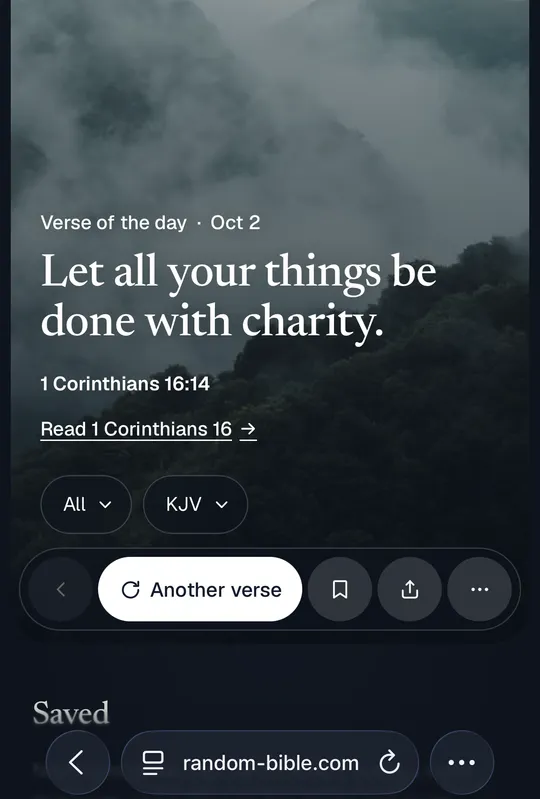
Open this page in Safari or ChromeSince iOS 16.4, Chrome and Edge on the iPhone can add it from Share too.
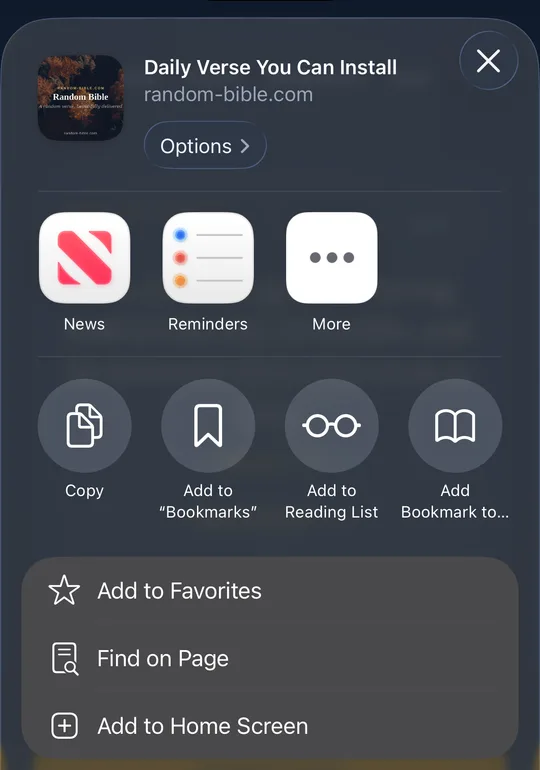
Tap Share, then Add to Home ScreenThe Share button is in the toolbar. Scroll the sheet down to find the row.
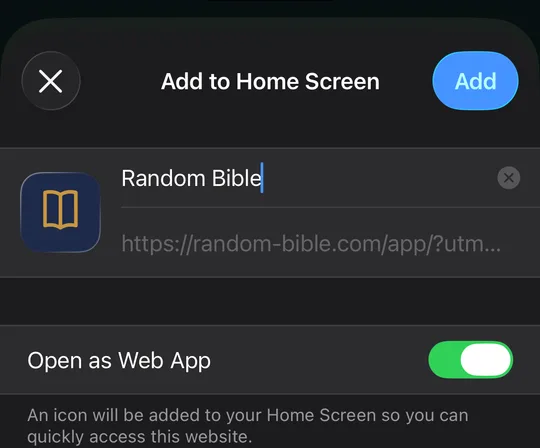
Tap AddThe icon lands on your home screen, and opens without the browser around it.


Android
Open this page in ChromeEdge, Brave and Samsung Internet install it too, from the same menu.
Tap Install appChrome offers it in the bar at the bottom of this page, or from the ⋮ menu at the top right.
Confirm, and it is on your home screenChrome asks once more. The icon then sits beside your other apps.
Desktop

Click Install in the address barChrome, Edge and Brave put it at the right-hand end while you are on this page. Safari on a Mac uses File → Add to Dock instead.
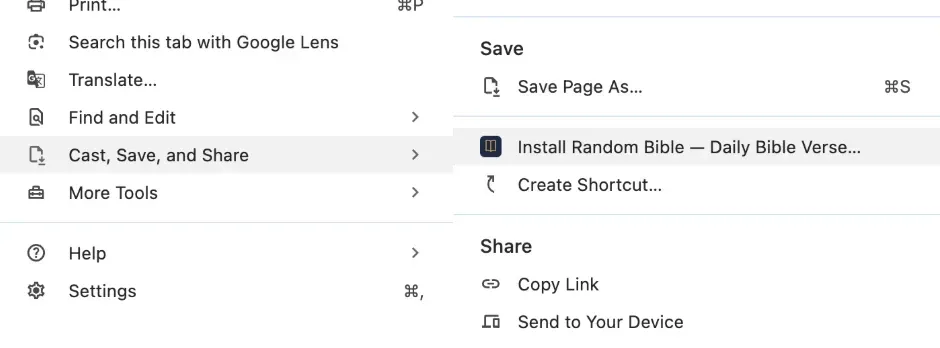
No icon there? Use the ⋮ menuOpen Cast, Save, and Share, then Install Random Bible. The icon is hidden on pages the browser has not decided are installable yet.
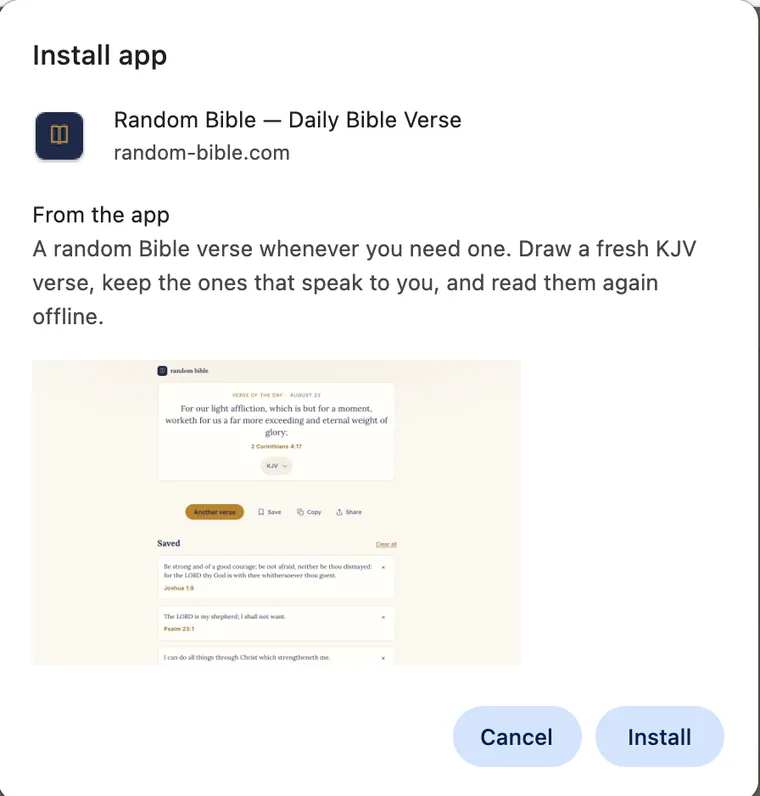
Confirm, and it opens in its own windowThe dialog shows what it is about to install. After that the app has an icon in the dock or taskbar, and no tabs or address bar around it.


Installing on your phone?
Open this address on the phone, in Safari or Chrome, and follow the steps there.
random-bible.com/appOr a verse on every new tab
On a computer, the Chrome extension shows today’s verse each time you open a tab. Same verses as the app, and no icon to remember.
Your saved verses
Kept in this browser. Install the app to have them on your home screen.
How the app works
The verses come from a hand-picked pool about peace, hope, strength and comfort, and each one still makes sense outside its chapter. For a draw with nothing held back, switch to every verse (31,102).
The verse of the day is picked by the date, so it is the same for everyone and matches the Chrome extension’s new tab. It changes at your local midnight.
The app carries the King James Version, World English Bible and American Standard Version, plus public-domain Bibles in German, Spanish, French, Italian, Hungarian, Dutch, Portuguese, Russian and Chinese. Any verse opens its chapter, out of all 1,189 in the KJV.
Saved verses stay in your browser’s storage on the device and are never sent anywhere. Clearing browser data clears them too.
Questions about the app
Is this an app I install from the App Store or Google Play?
No. Random Bible is a web app (a PWA), so it installs straight from the browser. Open this page, tap Install (or Share → Add to Home Screen on iPhone), and it lands on your home screen with its own icon. Nothing is downloaded from a store, and there is no account.
Does it work without internet?
Yes. The verses are stored on your device the first time you open the app, so today’s verse, the draw button and everything you have saved keep working with no connection. Two things do need the internet: reading the full chapter behind a verse, and the first time you pick a different translation. Both say so rather than failing quietly.
Where are my saved verses kept?
On your own device, in the browser’s local storage. They are never sent anywhere, which also means they do not follow you to another phone, and clearing your browser data clears them.
How is the daily verse chosen?
It is picked from the curated pool by the calendar date, so it is the same verse all day and changes at your local midnight. It is the same verse the Chrome extension shows on a new tab that day. Tap “Another verse” any time you want a random one instead, or narrow the draw to Psalms, the Gospels or either testament first.
Can I read it in a language other than English?
Yes. Alongside the King James Version, World English Bible and American Standard Version, the app carries public-domain Bibles in German, Spanish, French, Italian, Hungarian, Dutch, Portuguese, Russian and Chinese. Pick one from the selector beside the verse. The app’s own labels stay in English; the scripture does not.
What is the difference between the app and the Chrome extension?
The app is for your phone or desktop home screen: you open it when you want a verse. The extension is for the browser: it puts a verse on every new tab without you asking. They share the same curated verses.

Put today’s verse on your home screen
Install the app0 days
Verse of the day
And the peace of God, which passeth all understanding, shall keep your hearts and minds through Christ Jesus.
Philippians 4:7Read Philippians 4in English (KJV)
Discover the Bible
Explore
Quizzes, word searches and guided reads.
Continue
Bible quizDavid and GoliathWord searchDavid and GoliathChoose a format



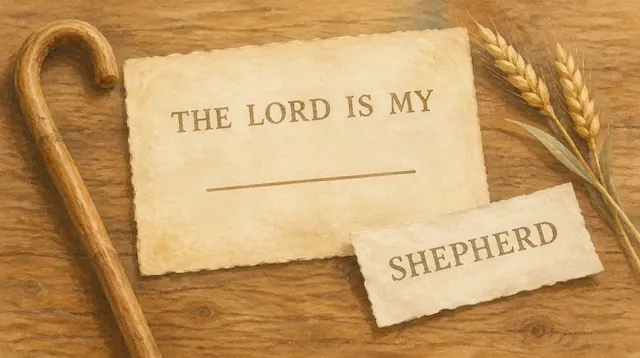
Read a Bible story

Choose a subject





Memorize a verse
Read it through first.
Saved
Clear all?Nothing kept yet. Tap the bookmark under a verse that lands, and it stays on this device and reads offline.
Kept on this device only. Clearing your browser data clears them, and they do not follow you to another phone.